
Best AI Tools for Document Set Comparison (2026)

Telamont is the strongest option for comparing contracts, specifications and drawings as one set; Document Crunch, Autodesk Construction Cloud, Procore, InEight and Trimble Connect each cover a narrower part of the job.
A contradiction between a prime contract and a specification section does not announce itself. It sits in the documents until someone builds the wrong thing, files a claim or absorbs the cost of a change. On a bid package that runs to hundreds of pages, the risk is rarely inside one document. It sits between them.
Telamont catches the errors, omissions and contradictions across contracts, specifications and drawings read as one set, so your team settles them on paper, not on site. This article compares six tools that read construction documents, with clear criteria for teams that need cross-document risk visibility before bid day or mobilization.
The six tools do different jobs. Some focus on project delivery, others review contracts. The comparison below separates what each one covers from what it leaves out, so you can match the tool to the documents your team needs checked.
Quick guide: 6 best AI tools for construction document set comparison
- Telamont: the strongest option for catching contradictions, omissions and risks across contracts, specifications, drawings and codes read together
- Document Crunch (Trimble): contract review with clause libraries, now extended to drawings
- Autodesk Construction Cloud: document control and project management with AI-assisted search across project records
- Procore: construction management platform with AI questions across the project data it stores
- InEight: capital project controls with document management and workflow automation
- Trimble Connect: model coordination and document sharing across BIM and 2D workflows
How we chose the best AI tools for document set comparison
Teams reviewing bid packages, subcontracts and revisions need more than a search bar. They need a tool that reads several documents against each other and shows where they disagree. Here is what we looked for.
- Cross-document coverage: does the tool read contracts, specifications and drawings together, or each one in isolation? A tool that reads one document type misses the contradictions that sit between two.
- Traceable findings: does every finding open on the page and passage it comes from? Your team needs the source in hand before raising an issue in a meeting or in an RFI.
- Construction-specific checks: does the tool understand notice periods, flow-down gaps, order of precedence and code requirements? Generic contract review misses the risks that matter on a project.
- Workflow after the finding: can your team act from where it found the issue: assign it, draft a notice or an RFI, track it to closure?
- Revision handling: when an addendum or a new drawing revision arrives, does the tool check it against the rest of the set, or does the review start over?
- Connection to existing systems: does it connect to where your documents already live?
The 6 best AI tools for construction document set comparison
1. Telamont: best overall for cross-document risk detection
A spec section calls for a two-year roofing warranty. The subcontract for the same scope says one year. One sits in the project manual, the other in the subcontract file, and the reviewer who reads one rarely has the other open. Read as one set, the gap shows up with both passages side by side.
Telamont runs risk detection across the prime contract, subcontracts, specifications, drawings and the codes added to the project. Contract playbooks check payment, scope, risk allocation, schedule and delays, dispute resolution, flow-down and precedence. Technical playbooks check spec-versus-drawing conflicts, items specified but not shown, and constructability. Each finding arrives with a priority, a category and the trades it affects, and opens on the page it comes from.
Your team then decides what to do with it. A finding moves to triage, to the operations board where it is assigned and closed, or into a notice or RFI drafted from the project documents. Nothing is retyped along the way, and Telamont works as a layer above the project management tool the team already uses.
Key features:
- Cross-document risk detection: catches contradictions, omissions, scope gaps and missed obligations across contracts, specifications, drawings and codes, each traced to its page.
- Playbooks: groups of checks per subject, from payment terms to technical coordination, so every project gets the same standard of review.
- Notices and RFIs from the finding: Telamont drafts the notice from the clause that requires it and scores it out of 100 before you send it, with what to fix first.
- Boards: one-page summaries of what the team checks again and again, such as notice requirements, payment terms and insurance, with a page reference on every line.
- Agent: answers questions about the project documents, typed or spoken, with the page behind each answer, and compares two versions of a document.
- Connected documents: syncs folders from SharePoint, Autodesk Docs and Dropbox, so new revisions are checked against the rest of the set.
Pros:
- Reads contracts, specifications, drawings and codes as one set, which catches the contradictions single-document tools miss
- Every finding opens on its source page, which gives the team a record from detection to closure
- Detection, triage, notices, RFIs and tracking in one place, so nothing is lost between steps
Cons:
- Focused on document risk: scheduling, field logs and accounting stay in the project management tool your team already uses
- Teams get the most out of it once playbooks and boards are set up for the way they review projects
- A full detection run takes from minutes to hours depending on the page count
2. Document Crunch (Trimble): contract review extended to drawings
Document Crunch, now a Trimble company, started as contract review software for US contractors. It reads standard and custom contract forms and flags clauses against a company's own standards and checklists. In October 2026, it added drawing review: its CrunchAI engine extracts text from drawing sets, such as notes and allowances, so teams can question drawings, contracts and specifications together in a chat interface, with answers linked to their sources.
The drawing release also checks sheet indexes and flags missing sheets, missing spec sections and discipline discrepancies. Findings can become standardized reviews with follow-up tasks.
Key features:
- Contract clause review: flags clauses and compares them against internal standards and checklists
- Drawing review: extracts and indexes text from drawing sets and checks sheet indexes for gaps
- Collaborative review: teams discuss findings and assign follow-up tasks in a shared environment
Pros:
- Established clause libraries and checklists for US contract forms
- Drawing review adds questions across drawings, contracts and specifications
- Part of the Trimble ecosystem
Cons:
- Drawing review launched in October 2026 and has less field history than the contract review
- Cross-document questions between drawings and contracts run mainly through chat; the automated drawing checks focus on sheet indexes and missing sections
3. Autodesk Construction Cloud: project management with AI-assisted search
Autodesk Construction Cloud brings document control, BIM coordination, quality and safety workflows together across the project lifecycle. Autodesk Assistant answers questions about the project data stored in the platform.
For document management, ACC offers version control, RFI and submittal workflows and issue tracking. It is built for project delivery, so contract clause analysis usually comes from a complementary tool.
Key features:
- Document control: version management, RFI and submittal workflows with configurable approvals
- AI-assisted search: Autodesk Assistant answers questions across project records stored in ACC
- BIM coordination: model coordination and clash review across disciplines
Pros:
- End-to-end project delivery platform with strong document control
- Model coordination across disciplines
- Large ecosystem of integrations and partner apps
Cons:
- No automated risk list comparing contracts, specifications and drawings
- Contract clause analysis needs a separate tool or partner add-on
4. Procore: construction management with AI questions
Procore is one of the most widely adopted construction management platforms, covering project financials, contracts, change orders, document control and field collaboration. Its AI features let teams ask questions across project data already stored in the platform.
Procore handles RFIs, submittals, drawings and correspondence in one environment. For clause-level risk detection across contracts and specifications, its marketplace includes partner tools that extend the platform.
Key features:
- Financials and contracts: budgets, change orders and contract workflows
- AI questions: answers across project records stored in Procore
- App marketplace: partner integrations that extend document review
Pros:
- Broad adoption across contractors of every size
- Financial tools tie contracts to budgets and change orders
- Marketplace includes document review and risk add-ons
Cons:
- Native features are not built around a cross-document risk list
- Contract risk analysis at the clause level relies mainly on partner tools
5. InEight: capital project controls with document management
InEight covers project controls, cost management, scheduling and document management for capital construction. InEight Document provides version control, configurable approval and RFI workflows and granular permissions, and it received FedRAMP Moderate equivalency authorization in January 2026 for US federal work. InEight Intelligence, announced in October 2025, adds AI across the project data in the platform.
InEight's strength is project execution and controls. Teams that need to model schedule and cost risk will find depth there; contract-to-drawing comparison sits outside its current scope.
Key features:
- Document control: document management with configurable workflows, version control and permissions
- InEight Intelligence: AI extension that works from the project data in the platform
- Project controls: cost and schedule risk modeling, estimates and portfolio reporting
Pros:
- Deep project controls for capital construction
- FedRAMP Moderate equivalency for government and infrastructure work
- Configurable approval workflows
Cons:
- No cross-document risk detection between contracts, specifications and drawings
- Contract risk review stays a manual step
6. Trimble Connect: model coordination and document sharing
Trimble Connect is a collaboration platform for sharing, viewing and coordinating construction models and documents across teams and disciplines. It supports both BIM models and 2D documents, giving field and office teams a shared view of project information.
It handles model viewing, markup, issue tracking and version management, and connects to Tekla Structures, SketchUp and other Trimble products. Contract risk detection is outside its scope.
Key features:
- Model and document coordination: view, share and coordinate BIM models and 2D documents
- Issue tracking: create and assign issues linked to model elements or documents
- Trimble integration: connects to Tekla Structures, SketchUp and other Trimble products
Pros:
- Handles BIM models and 2D documents for multi-discipline coordination
- Issues link to specific model elements or document locations
- Connects to Trimble's wider product line
Cons:
- No contract risk detection or clause-level analysis
- Built for sharing and coordination, not for comparing documents
Comparison table: the best AI tools for document set comparison
How the six tools compare on automated risk lists across documents, findings linked to their source and notice drafting:
| Tool | Automated risk list across documents | Findings linked to the source | Notice drafting from findings |
|---|---|---|---|
| Telamont | ✓ | ✓ | ✓ |
| Document Crunch | Chat-based | ✓ | ✓ |
| Autodesk Construction Cloud | ✗ | ✓ | ✗ |
| Procore | ✗ | ✓ | ✗ |
| InEight | ✗ | ✗ | ✗ |
| Trimble Connect | ✗ | ✗ | ✗ |
How does cross-document review protect GCs from change-order disputes?
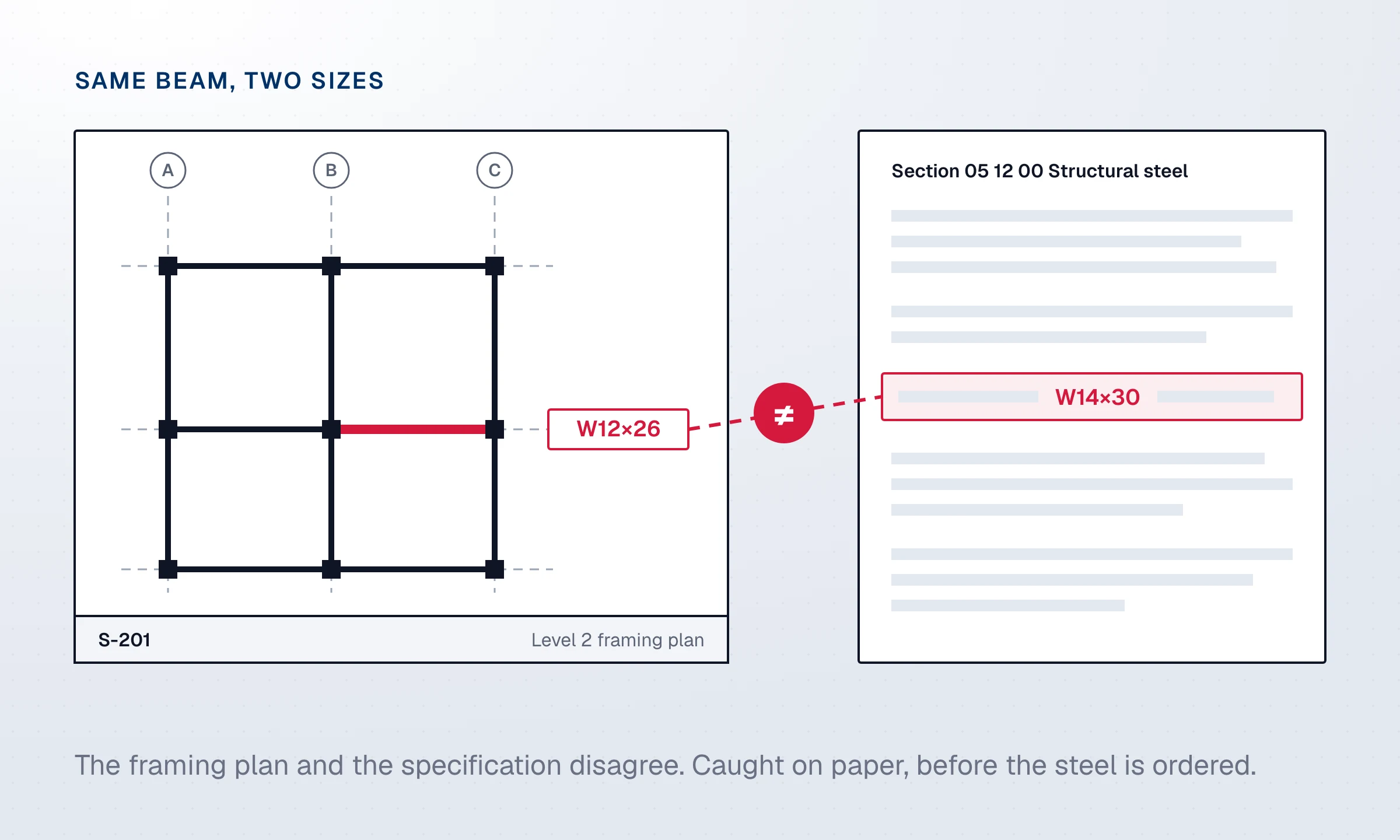
Many disputed changes start as a contradiction in the documents. A beam size on a structural drawing differs from the specification for the same work. A subcontract warranty falls short of the prime contract obligation. A schedule milestone conflicts with a contractual completion date. In a study published in the ASCE Journal of Construction Engineering and Management, practitioners estimated direct design error costs at a mean of 6.85% of contract value, before indirect costs.
When these contradictions reach the field, they become RFIs, stop-work events or claims. HKA's CRUX Insight analysis of claims and disputes on more than 1,100 projects found design issues to be the most frequent primary cause on EPC projects, with changes in scope and contract interpretation close behind.
A contradiction caught in preconstruction costs an RFI. The same contradiction caught in the field can cost a claim.
Cross-document review catches these contradictions during preconstruction, when an RFI or a conversation still settles them. For a GC, that also means a change caused by a design conflict is documented early, with its source, and sent with notice on time.
What should GCs look for when evaluating AI document comparison tools?
The first question is coverage. A tool that reads contracts but not specifications or drawings misses the contradictions that sit between document types. Look for one that reads the full project set together. Our guide to choosing AI software for construction risk covers the criteria in depth.
The second is traceability. Every finding should open on the passage it comes from. A flag without a source is one your team cannot use in a meeting, a negotiation or a claim.
Third, check what happens after a risk is found. Can your team assign it, draft a notice from the clause, or track it to closure? A tool that stops at the finding creates extra work. One that carries the risk into the team's workflow, with its source and its history, protects margins from detection to closure.
Why Telamont is the best AI tool for construction document set comparison
Most tools on this list manage documents, track project data or review contracts. Telamont reads the whole set together: contracts, subcontracts, specifications, drawings and codes. The risks that turn into disputes usually sit between those documents, and that is where Telamont looks.
Every finding arrives with its priority, its category and its source page. Your team reads the passage, decides what to do and turns the decision into a notice, an RFI or a tracked risk, with nothing retyped. For contractors running several projects, the same standard of review applies to every bid package, every subcontract and every revision.
FAQs about AI tools for construction document set comparison
What is cross-document AI review in construction?
Cross-document review reads several project documents together, such as contracts, specifications, drawings and codes, and flags where they disagree or where something required is missing. Telamont runs this review across the whole set and links each finding to its page, so your team can settle it while it is still on paper.
Can AI tools compare drawings against specifications?
Some can. Telamont's technical playbooks flag spec-versus-drawing conflicts, items specified but not shown and requirements that are never provided, each traced to the sheet and the spec section. Other tools extract text from drawings for search; automated comparison varies between platforms. See how dedicated construction AI differs from general-purpose assistants on this point.
Do these tools replace manual contract review?
No. Your team reviews each finding, checks the source passage and decides what to do. Telamont drafts notices and RFIs from the documents, and every one is reviewed by a person before it is sent. The tool does the cross-checking at scale, and the team keeps the judgment.
How long does a cross-document review take?
It depends on the size of the document set. A Telamont detection run takes from minutes to hours depending on the page count, and findings land in triage as soon as the run completes. When a revision syncs from a connected folder, it is checked against the rest of the set.
Can I use these tools during the bidding phase?
Yes. A cross-document review before bid day catches scope gaps, contradictions and notice obligations while they can still be raised as pre-bid questions. Telamont checks the bid package, including each addendum, against the contract, specifications and drawings, before prices are fixed.
What contract forms do AI document review tools support?
Coverage varies. Telamont reads any contract form, from AIA, ConsensusDocs and CCDC to owner-written contracts and their supplementary conditions. Other tools focus on specific US standard forms. Check which forms a tool supports before committing, especially on public projects.
Sources
- Lopez and Love, Design Error Costs in Construction Projects, Journal of Construction Engineering and Management (ASCE), 2012
- HKA, How best to use lessons from the past to optimise EPC delivery in the future
- Dredgewire, Trimble expands risk intelligence capabilities to include construction drawings (October 2026)
- InEight, FedRAMP authorized InEight Document
See Telamont on a project like yours
In 30 minutes, we walk you through a project similar to yours: the risks Telamont finds, the clause behind each one, and the notice it drafts for your team.