
The Complete Guide to Construction Notice Software (2026)

What construction notice software does, why notices fail on timing, content or delivery, and what to look for when you compare tools.

In May 2025, a New York appeals court upheld the dismissal of a contractor’s claim for more than $2 million in unpaid change orders and delay damages on the Fulton Street reconstruction in Lower Manhattan. The contract gave the contractor 45 days from first incurring damages to submit a statement of them, then an update every 30 days, and any claim that did not comply was deemed waived. The contractor had raised the delays in emails and at project meetings, but it had not submitted the damage statements the contract required.
Cases like this one explain why construction teams now look at software built for notices. A notice clause is a short paragraph, but it can decide whether a claim for time or money gets heard at all. This guide covers what construction notice software does, why notices fail in practice, what to look for when you compare tools, and how to set one up on a project.
Key takeaways
- A notice can fail in three ways: it arrives late, it leaves out what the clause requires, or it goes to the wrong person by the wrong method.
- Construction notice software lists every notice obligation in the contract documents, drafts the notice from the project documents when an event happens, and keeps a dated record.
- The most useful check happens before any event: a notice period too short to comply with, or a subcontract window that leaves no time to pass a notice up to the owner.
- A person on the project team should review and send every notice.
What is construction notice software?
Construction notice software is a tool that finds the notice obligations in a project's contracts, helps the team draft a compliant notice when an event occurs, and stores each notice as a dated record. A notice obligation is any clause that requires one party to tell another about an event, within a set time, in a set form, to a named recipient.
It sits between two things most teams already have. A template library gives you a starting letter, but it knows nothing about your contract. A project management system stores correspondence once it is sent, but it does not tell you that a notice was due. Notice software connects the clause, the event and the letter.
The deadlines themselves vary by contract form. Our guide to claim deadline tracking lists the notice windows in AIA, FIDIC, ConsensusDocs and federal contracts.
Why notices fail in practice
Most failed notices fail on timing, content or delivery, and each one needs a different fix.
Timing is the obvious one. A delay starts on a Monday, the site team deals with it, and the project manager looks for the notice clause two weeks later. If the contract gives 14 days, the right to claim may already be gone, whatever the merits.
Content is less obvious and just as costly. In Elite Construction v. Canada (2021), an Ontario court dismissed a C$4.1 million claim. The contract required written notice of an intention to claim within ten working days of the date the delay first occurred. The contractor pointed to documents it had sent, but none of them referred to the notice provision or stated an intention to claim, so the court held that the contractor had not complied with the notice clause and barred the claim.
A letter about an event is not always a notice under the contract. The notice has to say what the clause asks it to say.
Delivery is the third way. Some contracts require a specific method for a notice of claim, such as courier or certified mail, and name the person who must receive it. An email to the architect's field representative can satisfy everything else and still miss the clause.
What construction notice software does
Good notice software follows the life of a notice from the signed contract to the project record. The steps below are the ones to expect.
- It reads the contract package. The prime contract, the general and supplementary conditions, the subcontracts and the specifications are read together, because a supplementary condition can shorten a window set in the general conditions.
- It lists every notice obligation. Each line gives the event, the notice required, the deadline and the page it comes from.
- It flags the clauses that put you at risk. A notice period too short to comply with, or a subcontract that gives a trade partner as long to notify you as you have to notify the owner, is a risk to resolve before work starts.
- It drafts the notice when an event happens. The draft comes from the project documents: the clause that requires the notice, the document that establishes the event, and the facts your team provides.
- It checks the draft before it goes out. The check looks for a missing cost or schedule impact, a missing contract reference, vague facts or an unclear request.
- It keeps the record. Each notice is saved with its date and status, so the file exists if a claim follows.
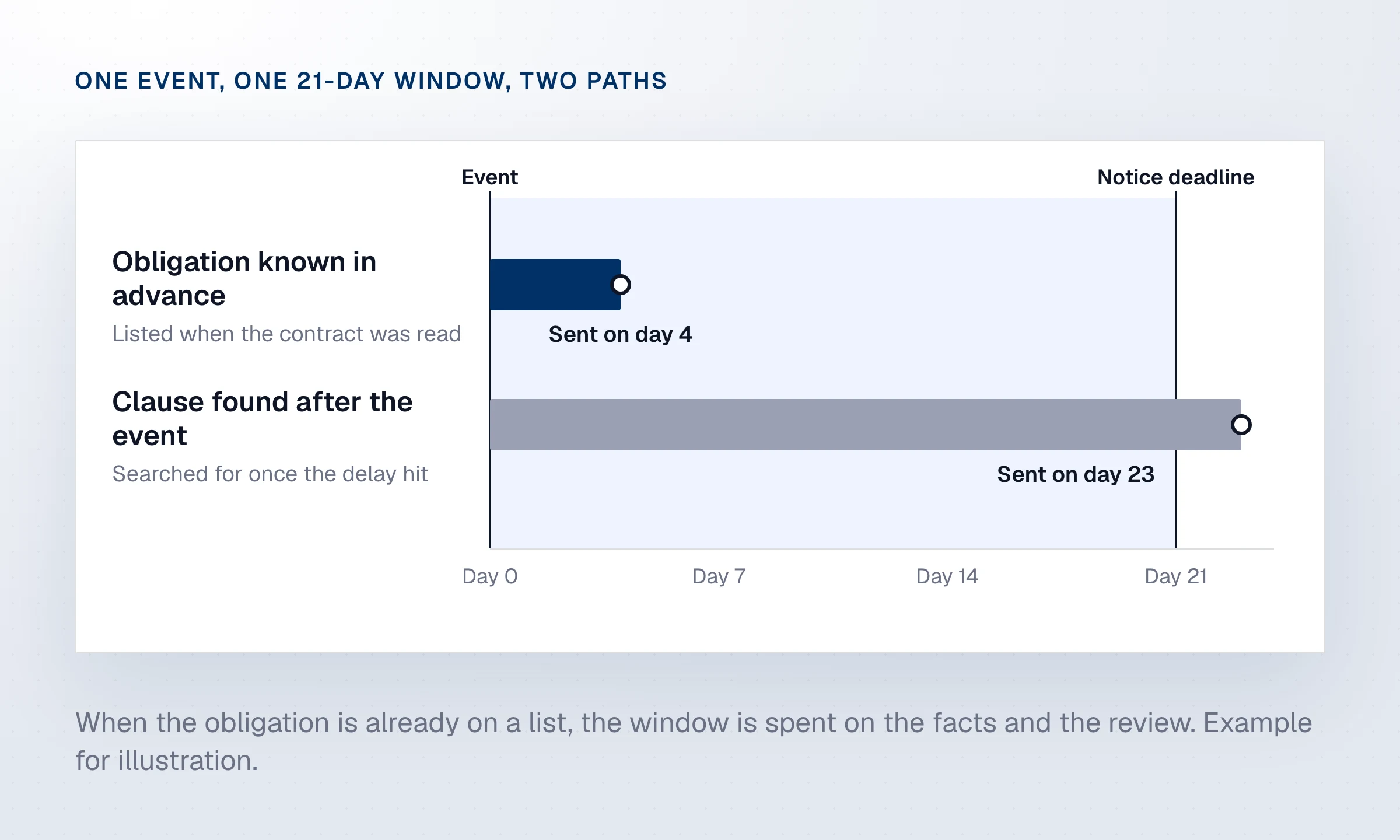
The first three steps matter most, and they happen before anything goes wrong. When the obligation is already on a list, the team spends the notice window on the facts and the review instead of on finding the clause.
What to look for when you compare notice software
Coverage of the whole contract package
A notice obligation rarely lives in one place. The general conditions may give 21 days, a supplementary condition may cut it to 7, and the subcontract has to give your trade partners fewer, say 5, so their notice reaches you in time to send yours. A tool should read these documents together and show which window applies to whom.
Findings before any event
The best time to learn that a notice period is unworkable is before you sign, or at least before work starts. Look for software that flags short notice periods and subcontract windows that leave no time to pass a notice up the chain as risks, so your team can negotiate them or plan for them while there is still time.
Drafts built from your project documents
A generic template asks your team to fill in the clause, the recipient and the facts by hand. A good draft starts from the contract itself: the right clause, the recipient the contract names, and the event as your documents record it. It should also fill your own letter template, so the notice looks like everything else your company sends.
A check before the notice is sent
The Elite case shows why content needs its own review. Software should check each draft for the elements a notice usually needs, such as the event, its date, the clause relied on, the expected impact on cost or schedule, and the request, and point to what is missing.
Human review and a dated record
A notice carries legal and financial consequences, so a person on the team should approve and send it. Every notice should then be stored with its date, its status and the clause it invokes, where the contracts team and counsel can find it later.
How to set up notice management on a project
- Load the full contract package at the start of the project, including every subcontract and any amendment.
- Review the list of notice obligations before mobilization and give each one an owner.
- Set an internal deadline well inside each contractual window, so there is time for review and sign-off.
- Agree on how the site reports a potential event, because the clock often starts when the condition is first observed.
- Keep each sent notice with its proof of delivery in the same place as the risk it relates to.
How Telamont handles construction notices
Telamont finds issues in your drawings, specs and contracts, so you fix problems on paper, not on site. For notices, that work starts before any event. Risk detection flags notice and cure periods too short to comply with, obligations passed down to a subcontract without their protections, and an order of precedence that lets a shorter window win.
A notice requirements card in Boards lists every notice obligation in your contracts with its event, the notice required, the deadline and the page. Your team can share it, export it to PDF and reuse it as a template on the next project.
When an event happens, you start a notice from a risk Telamont found or from scratch. Notice drafting carries over the project, the contract, the clause and the dates, asks for the context, the recipient, the tone and your template, then drafts the notice with each statement linked to its source. Before you send, it scores the notice out of 100 and lists what to fix first, from the impacts and the contract citation to the facts and the tone.
You review the notice and send it from your own email. Telamont keeps it with its date and status, so the record is ready if a claim follows. Software can help you get the notice right, but whether an event qualifies, and how to present a disputed claim, remain decisions for your team and your counsel.
This guide is general information. For the obligations on a specific project, check the signed contract and the law that governs it.
FAQ
What is construction notice software?
Construction notice software finds the notice obligations in a project's contracts, drafts a notice from the project documents when an event happens, checks it before it is sent and keeps a dated record. It covers delay, change, differing site condition and claim notices.
How is notice software different from a notice template?
A template gives you the shape of a letter. Notice software starts from your contract: it knows which clause applies, who must receive the notice and what it has to contain, and it drafts from the facts in your project documents.
Does notice software send notices automatically?
It should not. A notice can affect your rights under the contract, so a person on the project team reviews it and sends it by the method the contract requires. With Telamont, you send the notice from your own email after review.
Which contract forms does it work with?
Software that reads the clauses in your own documents works with standard forms such as AIA, ConsensusDocs, FIDIC and CCDC, and with contracts drafted by the owner. What matters is that it reads the version you signed, including the supplementary conditions.
Can notice software replace a construction lawyer?
No. It helps your team find obligations early and send complete notices on time. Whether an event gives rise to a claim, and how to argue a disputed one, are questions for your counsel.
Sources
- Court Buries Contractor’s Claim Over Lack of Contractual Notice, Thomas H. Welby and Gregory J. Spaun, Construction Industry Council of Westchester & Hudson Valley, 2025
- Case Review: Elite Construction v. Canada, 2021 ONSC 562, Jordan Bierkos and James Christie-Brooks, Construction Law Canada, 2023
See Telamont on a project like yours
In 30 minutes, we walk you through a project similar to yours: the risks Telamont finds, the clause behind each one, and the notice it drafts for your team.