
How do you verify what an AI tool flags in construction documents?

Open the pages each finding points to, check that it read the latest revision, and let the project team decide what to do with it.
Say an AI review of your bid set flags this: the partition schedule shows a fire-rated corridor wall going up to the underside of the deck, but the drywall section of the spec stops corridor walls just above the ceiling. Before anyone writes to the architect, someone has to decide whether the tool got it right.
That check should take a few minutes. Open the sheet and the spec paragraph the finding points to, read them side by side, and make sure they really say different things. Then make sure neither one was changed by an addendum. What to do about it after that is the team's call.
Open the pages the finding points to
A useful finding tells you exactly where to look: the sheet and detail, the spec section and paragraph, the contract clause. Open each one. If a finding gives you a conclusion with nothing to check it against, treat it as a lead you still have to run down.
Read the two sources before you read the tool's explanation. If you reach the same conclusion on your own, you're done. If you don't, the explanation usually shows what one of you missed, often a revision or a reference to another sheet.
In the corridor wall case, the estimator opens both pages and sees the conflict right away.
Make sure it read the latest version
A lot of false alarms come from old documents. A finding based on a replaced sheet looks exactly like one based on the current sheet, so check which revision it quotes before you spend time on it. During bidding, look for an addendum that touches the same item. After award, look at revisions, RFI answers and change orders.
Back to the corridor wall. The precon lead goes through the addenda issued so far: none of them touches the corridor walls, and the finding quotes the current sheet. So the conflict is real. It goes out as a pre-bid question with both pages attached, and if the answer comes late, the team decides how to carry it in the price.
Also check that the whole set was uploaded. If a spec division is missing, the review can't flag anything in it.
Why nobody should skip the check
In June 2023, a federal judge in New York fined two lawyers and their firm $5,000. They had filed court decisions that ChatGPT made up, quotes included, and stood by them when questioned.
The judge had no problem with the AI itself. The opinion says "there is nothing inherently improper about using a reliable artificial intelligence tool for assistance," and that lawyers still have "a gatekeeping role" over what they file.
A finding that ends up in an RFI, a notice or a claim needs the same gatekeeper. Generative AI can write things that sound right and are wrong. NIST calls this confabulation, and warns that people tend to believe it because of the confident tone or the citations that come with it.
The citations can be wrong too. A 2026 study of AI assistants that search the web found that 3 to 13 percent of the web addresses they cited had no record in the Internet Archive's Wayback Machine, which suggests they never existed. A finding that quotes "Section 07 92 00" looks solid. Open the section anyway.
A finding is only as useful as how fast someone can check it.
Clear the quick ones first
Some findings take a minute: two quantities that don't match, a door that shows up on one sheet and not the other. Others depend on what the designer meant and need a call with the architect or engineer. Sort them that way, clear the quick ones, and book the calls.
How much each risk matters is up to the team. It depends on the contract, the crews and how much risk the company is willing to carry. A tool can find and organize the issues, and the people running the project decide what each one is worth.
Where checks go wrong
The most common mistake is trusting a whole batch because the first few findings were right. Being right five times says nothing about the sixth. Another is checking only the surprising findings and waving through the ones that confirm what the team already suspected.
Sometimes nobody owns the review. Give one person per project the job of clearing findings, and a second person the job of spot-checking them, or the habit fades after a few weeks.
And when you throw a finding out, write one line on why: settled by an addendum, already covered in a subcontract. The next person won't have to check it again.
Where Telamont fits
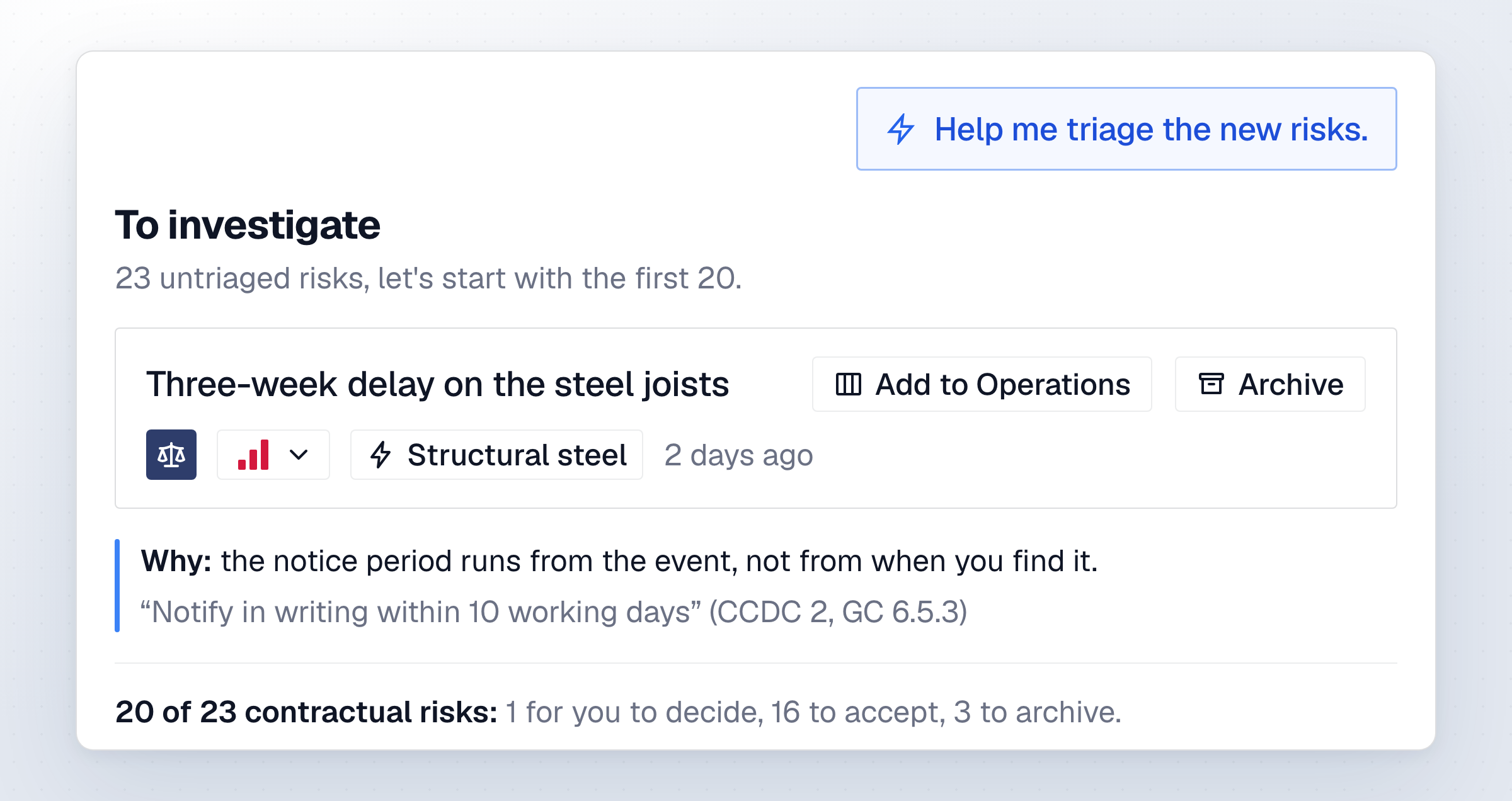
Telamont finds errors, omissions, contradictions and risks in your drawings, specs and contracts, so you fix problems on paper, not on site. In triage, each finding shows a title, a priority, a category, the trades involved and a short explanation, and it opens the document on the page it came from, so whoever reviews it can confirm it in minutes.
The team then adds the finding to its operations board or archives it, and decides what each risk is worth. Telamont is a dedicated construction platform, hosted in Canada: no training on customer data, zero data retention at AI model providers, data isolated per customer, and administrators control access.
FAQ
Can an AI tool make up findings in construction documents?
Yes. Any generative AI tool can write something confident and wrong, which NIST calls confabulation. When each finding links to the page it comes from, a wrong one is quick to spot and throw out.
How long should it take to check one finding?
A conflict between two documents often takes a few minutes when both pages are shown. Findings that depend on what the designer meant take longer and usually need a call with the design team.
Does a senior person need to check every finding?
No. A project engineer can clear direct conflicts, and findings that need interpretation can go to the project manager or the design team.
What should a tool show next to each finding?
The exact spot in each document, the revision or date of each, and a plain explanation of the problem. With those three things, a reader can confirm or throw out the finding quickly.
What should a team do with a finding it throws out?
Archive it with a one-line reason, such as settled by an addendum or already covered in a subcontract. The record shows it was reviewed, and the next person won't check the same item again.
Sources
- Mata v. Avianca, Inc., No. 22-cv-1461 (PKC), Opinion and Order on Sanctions, U.S. District Court for the Southern District of New York, June 22, 2023
- NIST AI 600-1, Artificial Intelligence Risk Management Framework: Generative Artificial Intelligence Profile
- Rao, Wong and Callison-Burch, Detecting and Correcting Reference Hallucinations in Commercial LLMs and Deep Research Agents, arXiv, April 2026
See Telamont on a project like yours
In 30 minutes, we walk you through a project similar to yours: the risks Telamont finds, the clause behind each one, and the notice it drafts for your team.